
If you run a business with partners, you may need to go through an IRS-authorized e-file provider or IRS-authorized tax software. It is the U.S. Return of Partnership Income. The IRS requires this form to report your partnership’s income, losses, and deductions. This blog will help you understand what Form 1065 is, who must file it, and how to file it electronically using IRS-authorized e-file providers and professional tax software. We will also cover who must file it and the steps to file it properly.
What Is IRS Form 1065?
Wondering what is form 1065? It’s the U.S. Return of Partnership Income used to report your partnership’s finances. It is an informational tax return that partnerships file to report income, deductions, gains, losses, credits, and other tax information to the IRS. Each partner also gets a Schedule K-1, which shows their share of the firm’s income. The IRS uses Form 1065 to report the partnership’s income, deductions, gains, losses, credits, and other tax information for the year. Partners pay tax on their income share, even if the firm did not send them a check.
Partnership Tax Return 1065
It is a U.S. tax return that partnerships use to report their financial information to the IRS. It is used to report the firm’s profit, loss, deductions, and tax credits. No tax is paid with IRS Tax Return 1065. Instead, the tax duty moves to the partners, who must show their share on Schedule K-1 and pay taxes on their own return. Each partner must pay income tax on their share, even if the income was not paid out.
Who has to file the Partnership Tax Return Form 1065?
- Domestic partnerships operating in the United States.
- Multi-member LLCs that have not elected to be taxed as a C corporation or S corporation.
- Certain foreign partnerships with U.S.-source income or a U.S. trade or business, if required under IRS rules.
What Documents Are Necessary to Report Partnership Taxes?
To file IRS Form 1065, you need key year-end financial reports. These include the income statement, balance sheet, and a list of all tax-deductible costs. The start balance on this year’s balance sheet must match the end balance from last year.
Before you meet a tax preparer for a partnership return, have the following ready:
- Basic info about the firm, like the Employer ID number, business code (NAICS code), and the date it was set up.
- The accounting method used—cash or accrual. This shows when to record income and costs.
- A full record of gross receipts or sales, sales returns and allowances, discounts, and other sources of business income.
How to Send the 1065 Form?
You can mail the 1065 Form or file it online using IRS-approved tools. For the paper, go to the IRS site, download the form, print it, and send it by mail. Many partnerships are required to file Form 1065 electronically under current IRS e-file rules. Check the latest IRS requirements based on your partnership’s size and filing obligations. The 1065 Form is due by the 15th day of the third month after your tax year ends. If this day falls on a weekend or a public holiday, the next workday becomes the due date.
What Info Does Schedule K-1 Include?
Schedule K-1 tells the IRS and each partner about:
- Ordinary business income or loss
- Capital gains and losses
- Rental real estate income
- Interest and dividend income
- Tax credits
- Other separately stated tax items
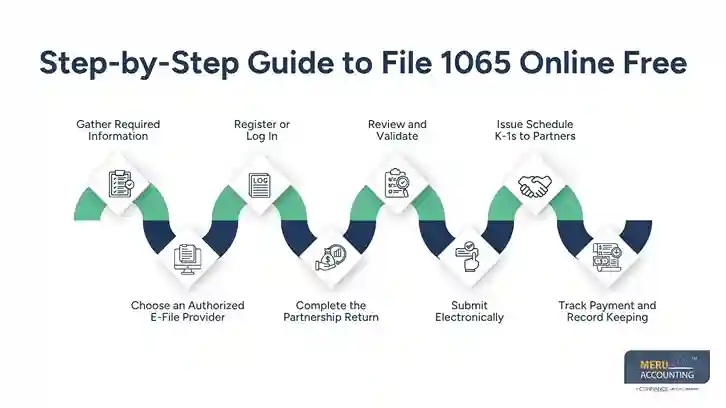
Step-by-Step Guide to File 1065 Online Free
Follow these detailed steps to file 1065 online for free in 2025:
1. Gather Required Information
Collect the following before logging into the e-file system:
- Employer Identification Number (EIN): Issued when you registered your partnership.
- Business address and principal activity.
- Accounting records: Profit & loss statement, balance sheet, and general ledger.
- Partner details: Names, addresses, and Taxpayer Identification Numbers (TINs) for all partners.
- Prior-year Form 1065 copy (if available) to help pre-populate certain fields.
Having these items on hand will streamline the process and reduce data entry errors.
2. Choose an Authorized E-File Provider
To file Form 1065 online, you must use an IRS-authorized e-file software or portal. For a free option, look into:
- IRS Free File Program: Designed for entities with income below certain thresholds. Though traditionally aimed at individual filers, select partners may qualify to use business returns in 2025. Check the IRS Free File website for up-to-date criteria.
- Authorized Free E-File Software: Occasionally, the IRS partners with specific software vendors to offer free or low-cost e-file options for small partnerships.
If your partnership’s assets or income exceed Free File thresholds, you may need to use a low-cost provider (often under $50 for Form 1065).
3. Register or Log In
- Go to the IRS Free File portal or the website of the authorized e-file provider you selected.
- Create an account by entering your EIN, business information, and a secure password.
- Verify your identity, which may require a verification code sent to your email or phone.
After successful login, you’ll be directed to a dashboard where you can start your 1065.
4. Complete the Partnership Return
Within the software –
- Enter Basic Information: Business name, address, EIN, and fiscal year.
- Financial Details:
- Input total income, cost of goods sold (if applicable), and other income items.
- Provide detailed deductions—salaries, rent, advertising, etc.
- Enter any credits or special items, such as foreign transactions.
- Schedule K-1 Preparation:
- The software will generate Schedule K-1 forms for each partner based on ownership percentages.
- Review each K-1 for accuracy—capital contributions, profit/loss shares.
- Most online platforms guide you section by section, with help tips for each line item. Keep an eye out for any pop-up alerts about missing or inconsistent data.
5. Review and Validate
Before final submission:
- Use the built-in review tools to catch calculation errors or missing fields.
- Confirm that totals on the main return match the aggregate of all Schedule K-1 lines.
- Check that each partner’s information is correctly spelled and TINs are accurate.
The IRS system will not accept returns with critical errors, so this step is essential to ensure your return is accepted on first submission.
6. Submit Electronically
Once everything is validated:
- Click the e-file button in your software.
- Agree to e-sign the return electronically (typically by entering your name and title).
- Submit the return to the IRS portal.
You should receive an acknowledgment within 24–48 hours confirming acceptance or notifying you of any issues. Keep this acknowledgment for your records.
7. Issue Schedule K-1s to Partners
After IRS acceptance, distribute each partner’s K-1:
- Many e-file platforms offer an electronic distribution feature—partners can download their K-1 securely.
- If your software doesn’t support this, download PDFs and email them to each partner (password-protected), or mail printed copies.
Ensure delivery by the individual tax filing deadline (usually April 15, 2025, for calendar-year partnerships).
8. Track Payment and Record Keeping
- If your partnership owes a payment with Form 1065, you can pay online via the Electronic Federal Tax Payment System (EFTPS). EFTPS is free and secure.
- Store a digital copy of the filed Form 1065 and all K-1s in your records for at least seven years, per IRS guidelines.
Key Schedules in IRS Form 1065
- Schedule L: This shows your balance sheets at the start and end of the tax year. It lists all assets, debts, and owner’s capital.
- Schedule M-1: This shows items not on the tax return. It explains the gap between your net income and the IRS’s view of taxable income.
This is common, but ask your tax expert if unsure. - Schedule M-2: This tracks changes in partners’ capital. This includes profits kept in the firm or moved out, and non-cash changes.
- Schedule K-1: Each partner must get one. It shows their share of the firm’s profits, tax breaks, and credits.
This form includes data like rental income, foreign deals, capital gains, and more.
Where Can You File IRS Form 1065 Online?
You can file IRS Form 1065 online using IRS-authorized e-file providers and approved tax software. It also gives you tools to track your filing. Several professional tax software solutions help you prepare and electronically file 1065 quickly and securely.
- CCH Axcess – Easy to use, full of helpful features
- Intuit ProConnect Tax – Trusted by many firms, great support for Form 1065
- Thomson Reuters UltraTax CS – Good for all sizes of firms, works well with other tools
- Wolters Kluwer CCH Axcess Tax – Made for large firms with complex tax needs
There are two main ways to file IRS Form 1065 online
1. IRS-Authorized E-File Providers
Your Gateway to Secure and Reliable Online Filing
Recognizing the growing preference for online filing, the IRS has established a network of authorized e-file providers. These providers, adhering to stringent IRS standards, offer a secure and reliable platform for submitting IRS Form 1065 electronically. They ensure the integrity and confidentiality of your partnership’s financial data, providing peace of mind throughout the filing process.
Some popular IRS-authorized e-file providers include:
- CCH Axcess:
Known for its easy-to-use tools and strong features, CCH Axcess helps partnerships file Form 1065 online with ease. It’s a top pick for many tax pros. - Intuit ProConnect Tax:
Intuit ProConnect Tax is cloud-based professional tax software that supports 1065 preparation and electronic filing. It gives users a smooth and trusted filing process. - Thomson Reuters UltraTax CS:
UltraTax CS is widely used by accounting firms to prepare and electronically file partnership tax returns. It blends with current finance tools and supports 1065 filing with ease. - Wolters Kluwer CCH Axcess Tax:
This platform helps large firms handle tough tax needs. It comes with high-end tools that help with 1065 and more complex tasks.
To find an IRS-authorized e-file provider that meets your needs, you can visit the IRS website.
2. Use the IRS Free File program
If your income is low or mid-range, you may file 1065 online for free through the IRS Free File program. This program is backed by the IRS and run by trusted tax software firms. You can check the list of these providers on the IRS site.
E-Filing Procedure:
Once you have chosen an e-file provider, you will need to create an account and provide your partnership’s information. You will then be able to upload your completed Form 1065 and any other required forms or attachments. The e-file provider will then submit your return to the IRS electronically.
Common Mistakes When You File 1065 Online
Even if you’re trying to file 1065 online for free, you have to avoid common errors like:
- Missing partner details
- Wrong business code
- Forgetting to attach Schedule K-1 forms for each partner
- Math errors when totaling income or expenses
- Filing late (the deadline is usually March 15 for calendar-year partnerships)
A simple double-check can save you a lot of trouble later.
Best Software to File Form 1065 Online Free
There really aren’t reputable free options for Form 1065. But, you can keep checking the following options:
1. IRS Free File Program
- Some approved software providers support 1065.
- Income limits apply.
2. TaxAct or FreeTaxUSA
- Sometimes offer free trials or reduced fees.
- Basic partnerships may qualify for free options.
3. Drake Tax or TaxSlayer
- Good for small firms.
- May include free e-filing in packages.
Who Should Not Use IRS Form 1065?
Not all businesses need to file Form 1065. This form is only for partnerships and some multi-member LLCs. If your business fits into one of the groups below, you should not use Form 1065:
1. Sole Proprietorships
If you run your business alone, you are a sole proprietor. You must report your income and costs using Schedule C, filed with your personal tax return (Form 1040). You do not need Form 1065.
2. Single-Member LLCs
A single-member LLC is treated like a sole proprietorship for tax purposes. It is a “disregarded entity” in the eyes of the IRS. You must file Schedule C, not Form 1065.
3. Corporations
If your business is a corporation, you must file a different form.
- C Corporations file Form 1120.
- S Corporations file Form 1120-S.
Only true partnerships and LLCs with two or more members are required to file Form 1065. Before you file, make sure you know your business type.
Can a Partnership Use the Cash Method?
Yes, most partnerships can use the cash method of accounting. It’s simple and works well for small businesses.
What is the cash method?
- You report income when you receive it.
- You report expenses when you pay them.
It tracks real cash going in and out. Many small firms like this method because it’s easy to follow.
When you file Form 1065 online for free, you must choose a method—cash or accrual. You can choose cash unless:
- You are a tax shelter, or
- Your average annual gross receipts exceed the IRS inflation-adjusted threshold under the gross receipts test.
If you meet these rules, you can use the cash method with no issue.
State Filing Requirements for Partnerships
Filing Form 1065 is a federal rule. But many states have their own tax return rules for partnerships. Even if you file Form 1065 electronically with the IRS, you might need to send a state form too.
A few examples:
- California – Must file Form 565 with the California Franchise Tax Board.
- New York – Must file Form IT-204 with the New York State Department of Taxation.
- Texas – No income tax, but may require a Franchise Tax Report
Each state has its own forms, deadlines, and rules. Some may charge fees or want more info from partners. Make sure to check your local state tax office so you stay compliant.
If you run a partnership, it’s key to know what is Form 1065 and why you need to file it. The good news is that you can file Form 1065 electronically using IRS-authorized e-file providers and professional tax software, making the process faster and more convenient. This saves time and helps ensure your partnership return is filed accurately and on time. Just be sure to file it right and on time. If it feels hard, get help from a tax pro. Whether you’re new or just need a guide, you now know how to file 1065 online the easy way.
Need help filing Form 1065 electronically? Meru Accounting makes it smooth and stress-free. Our skilled tax team helps you file online with care. We make sure your partnership’s tax data is sent right and safely to the IRS. With Meru Accounting, you can be sure that your tax tasks are done right and on time. This gives you more time to grow your business.