Common Xero Mistakes to Avoid in 2025
Using Xero is a smart move for small and medium businesses. But if not used the right way, it can cause confusion and errors. Many users make Common Xero Mistakes that can lead to wrong reports, tax issues, or poor cash flow tracking. In 2025, avoid these mistakes to make the most out of your accounting system. Staying updated with Xero’s latest features and best practices is key to keeping your books clean and compliant. A small oversight today can turn into a major accounting headache tomorrow.
1. Not Linking All Business Bank and Card Accounts
Not linking all business bank and card accounts is one of the common Xero mistakes that leads to missing expenses and sales entries. Also, keep your personal and business accounts apart. This helps avoid tax issues and makes your reports clearer. Your bookkeeper will thank you! With clean data, you can also make smart decisions for your business.
2. Not Matching Bank in Xero with Real Bank Statements
One of the common Xero mistakes is not matching Xero with your actual bank records, which causes incorrect data in your books. Run a bank reconciliation report in Xero often. Then check it with your real bank statement. This helps find errors and stop duplicates before they cause big issues.
3. Not Checking User Access and Roles
Many owners give full access to all key staff in Xero accounting without limits. Only give access when needed. Review who can use what every three months. And don’t forget, remove access fast when a staff member leaves your company.
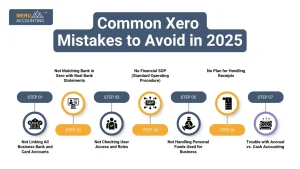
4. No Financial SOP (Standard Operating Procedure)
Have a clear SOP that shows who does what, when, and how. Say your operations head runs the aged receivable report. Then they know when clients owe you money. Also, set rules for what happens if a client is late. Like: if a payment is two weeks late, send a reminder. This gives your team a clear way to act in each case.
5. Not Handling Personal Funds Used for Business
If you pay a company cost from your own money, track it right in Xero. Many owners aren’t sure how to log such costs. But you can still claim them at tax time if they’re logged right. Xero has tools to record personal spending used for business in a clean, easy way.
6. No Plan for Handling Receipts
Not having a way to store and sort receipts is a big issue. Without a process, receipts pile up fast. Then, at year’s end, you face a big mess. Use tools or apps that work with Xero to store and sort receipts as they come in.
7. Trouble with Accrual vs. Cash Accounting
There are two key types: cash and accrual.
In cash-based books, costs show up when paid. In accrual books, they show up when the job or product is done.
Say you pay in March but got the item in February. If using accrual, log it in February. Xero lets you pick and manage this choice with ease.
Why Avoiding Common Xero Mistakes Is Important?
Using Xero well helps you keep clean records, make correct reports, and stay on track with rules. But Common Xero Mistakes can hurt your business in many ways. Here’s why you should avoid them:
1. Mistakes Cause Wrong Numbers in Reports
If you type in the wrong data or skip key steps like matching bank entries, your reports won’t be right. This can give you a false view of how your business is doing. You may end up planning with bad information, which can lead to poor budgets and wrong profit checks.
2. You May Pay More Tax or File Late Returns
When your data is wrong, your taxes may be wrong too. You might pay too much or not enough. Missed or late filings can lead to fines or audits. These issues take time to fix and can harm your image with tax officials.
3. Wrong Data Affects Your Cash Flow
Cash flow keeps your business alive. If the numbers in Xero are wrong, you may think you have more or less cash than you do. This can lead to missed bills, late payments, or even bounced checks.
4. It Can Lead to Poor Business Decisions
Good choices come from good data. If Xero shows the wrong numbers, you might invest at the wrong time or cut spending where you shouldn’t. Mistakes in data lead to bad calls that hurt growth.
5. Fixing Errors Later Wastes Time and Money
Finding and fixing old errors takes time. You might need help from a pro, which costs more. Fixing past mistakes is harder and takes longer than doing things right from the start.
How Xero Errors Affect Your Business
1. Mistakes Lead to Wrong Reports
If entries are not done right, your reports will show the wrong data. This affects business decisions and tax filings.
2. Risk of Tax Issues and Late Fines
Wrong tax data is one of the Common Xero Mistakes that can lead to errors in returns.. You may face fines or late fees.
3. Poor Cash Flow Tracking
If your data is wrong, cash flow reports are not clear. This may lead to shortfalls or missed payments.
4. Bad Records Hurt Decision Making
If your records are not right, you can’t plan your business well. You may invest or spend in the wrong areas.
5. Fixing Errors Takes Time and Money
Fixing Common Xero Mistakes later can take hours and cost extra money. They also cost more if you need help from a professional.
Signs You Are Making Mistakes in Xero
1. Reports Show Wrong Figures
Reports that don’t match expected values may be caused by Common Xero Mistakes in data entry.
2. Duplicate Records Are Found
Duplicate contacts or invoices often point to Common Xero Mistakes in setup or syncing.
3. Bank Feed and Books Don’t Match
If your bank feed is not the same as your Xero books, your accounts are off.
4. You Can’t Track Outstanding Payments
If you don’t know who owes you money, your invoicing process may be wrong.
5. Tax Deadlines Are Missed
If you often miss tax dates, Xero may not be set up or used the right way.
Best Practices to Use Xero in 2025
1. Reconcile Bank Feeds Weekly
Check and match your bank feeds with your books at least once a week.
2. Use Alerts for Bills and Invoices
Set reminders to pay bills and send invoices on time. Xero offers alert options.
3. Apply Correct Tax Codes
Use the right tax code for each entry. It helps with clean and accurate records.
4. Follow a Task Checklist
Make a list for daily, weekly, and monthly tasks in Xero. Stick to the routine.
5. Check Your Dashboard Often
Your Xero dashboard shows key details. Review it to catch any red flags early.
Xero Tips for Small Business Owners
1. Use the Mobile App
The Xero mobile app lets you send invoices or track spending on the go.
2. Don’t Ignore System Warnings
Xero will flag entries that look wrong. Always review and fix them.
3. Keep Contact Info Up to Date
Make sure all client and vendor details are correct. This avoids billing issues.
4. Review Payables and Receivables
Check who you owe and who owes you. Do this weekly to avoid cash issues.
5. Ask for a Monthly Review
Let your bookkeeper or accountant check your records every month.
Role of Bookkeepers in Preventing Mistakes
1. Bookkeepers Spot Issues Early
Trained bookkeepers help detect Common Xero Mistakes early and fix them fast.
2. They Know How to Use Xero Right
They use the system in the best way for clean and fast entries.
3. They Check All Records With Care
A good bookkeeper checks each entry for correct coding and matching.
4. Help with GST, BAS, and Payroll
They make sure you stay on track with tax and staff payments.
5. You Avoid Major Errors
With expert help, Common Xero Mistakes are less likely to happen in your books.
Avoiding Common Xero Mistakes in 2025 is easy if you follow the best practices. Use the software fully, train your staff, and stay consistent. It will save you time, reduce stress, and give you accurate reports that help grow your business.
At Meru Accounting, we help you avoid Common Xero Mistakes with easy setup, clear reports, and ongoing help. Our team knows Xero well and keeps your books clean and correct. If you are new to Xero or need to fix past errors, we’re here to help. Trust Meru Accounting to manage your Xero while you grow your business.
FAQs
Q1. What are the most Common Xero Mistakes in 2025?
Mixing personal and business costs, wrong GST setup, and ignoring bank reconciliation.
Q2. How often should I reconcile my bank in Xero?
Weekly is ideal. Don’t delay it till month-end.
Q3. Is it okay to enter data manually in Xero?
Yes, but double-check to avoid typos and entry errors.
Q4. Why is locking periods important in Xero?
It prevents changes to finalized records.
Q5. Can I correct a mistake after submitting reports?
Yes, but make changes with care or with an accountant.
Q6. Should I use Xero add-ons?
Yes, they help in automating payroll, inventory, and more.
Q7. Is Xero training needed for small teams?
Yes, even basic training prevents costly mistakes.