
How to Use QuickBooks for Law Firms: A Complete Guide
QuickBooks for law firms is a smart way to track cash, bill hours, and keep legal books clear. If you run a law firm, strong books help you plan, grow, and stay in line with the rules. Good records also build trust with banks, staff, and clients. With QuickBooks, you save time, cut slips, and keep a full view of your cash flow. This guide will show you how to use QuickBooks the right way for your law firm.
Why Law Firms Need a Tailored Accounting Solution
Law firms deal with client trust accounts, case-related expenses, and hourly billing. These features require an accounting system that meets legal standards and simplifies complex bookkeeping tasks.
Trust Account Rules
Law firms must manage client trust accounts with strict care and legal compliance. QuickBooks helps track these funds clearly, separating client money from firm revenue while avoiding misuse or accounting errors.
Billable Hours
Each lawyer’s time must be billed accurately for clients and cases. QuickBooks provides an easy way to log work hours, assign them to specific matters, and convert those hours into detailed invoices.
Clear Records
Legal practices often face audits and reviews, so recordkeeping must be precise. QuickBooks allows lawyers to organize transactions, payments, and case expenses in a clear, consistent way for each client.
Key Features of QuickBooks for Law Firms
QuickBooks for law firms offers features that support billing, expense tracking, financial reports, and trust management that are all done in one place.
Time Tracking
QuickBooks has built-in tools to log hours spent on each case. You can assign time to specific clients, and these records can be used to auto-generate bills with full accuracy.
Invoicing
You can create professional invoices linked to time entries and case costs. These invoices show clients a full breakdown of services provided and the charges they need to pay.
Trust Fund Tracking
QuickBooks supports legal trust fund tracking by allowing the setup of trust accounts and client-specific ledgers. This ensures you follow legal rules while keeping money separated.
Reports
You can create reports showing firm income, expenses, trust balances, and client-specific profits. These help with internal tracking and compliance with financial regulations.
How to Set Up QuickBooks for Law Firms
Setting up QuickBooks for law firms means building a chart of accounts for legal work, adding your clients and cases, and creating reports that fit your firm’s needs.
Pick the Right Plan
QuickBooks Online works well for small to mid-sized law firms needing mobility and cloud access. QuickBooks Desktop suits firms with more complex reporting and offline preferences.
Add Law Firm Information
Enter firm details such as name, business address, ABN or tax ID, and banking information. Ensure these entries match your legal registrations and tax obligations.
Create Legal Chart of Accounts
Set up accounts for income (fees, retainers), expenses (court costs, research), and liabilities (trust funds). Label each account clearly so reporting stays organized and accurate.
Add Clients and Cases
Create customer profiles for each client. Add case files as sub-customers or projects. This lets you track income, time, and costs by both client and case.
Managing Client Trust Accounts with QuickBooks
Client trust accounts are critical in legal work. QuickBooks for law firms makes it easier to track deposits, withdrawals, and balances per client.
Set Up a Trust Bank Account
Create a new bank account in QuickBooks named “Client Trust Account.” This should represent your actual trust account and must remain separate from operational funds.
Create Liability Accounts
Add a liability account named “Client Trust Liabilities” to track all deposits. When clients pay retainers, log the amounts here instead of your revenue accounts.
Use Journal Entries
For each trust transaction, make a journal entry that moves funds between the bank and trust liability accounts. Add client details to track balances per case.
Reconcile Often
Compare QuickBooks records to actual bank statements at least once a month. This ensures your trust ledger is accurate and meets legal and ethical requirements.
Tracking Billable Hours and Invoicing Efficiently
Lawyers work on billable time. QuickBooks makes time and billing efficient, helping you get paid faster and with fewer errors.
Add Time Entries
Log hours worked using the time tracker. Assign each entry to a specific client, case, and service type. You can also add notes for clear billing.
Link Time to Invoices
Once hours are logged, you can add them to invoices directly. QuickBooks lets you edit details or group services before sending the invoice to your client.
Set Up Recurring Bills
For ongoing matters or fixed-fee services, set up recurring invoices. This saves time and ensures clients receive their bills on schedule without manual work.
Track Paid and Unpaid Invoices
Monitor invoices in the dashboard. View outstanding amounts, partial payments, and overdue bills. Send reminders and follow up quickly to manage cash flow.
Generating Financial Reports for Legal Practices
Financial reports show how your law firm is doing. QuickBooks provides customizable reports to help you track money, time, and client accounts.
Profit and Loss by Case
Use class or project tracking to run profit and loss reports per case. These reports show earnings and costs for each legal matter, helping you measure success.
Trust Account Reports
Generate detailed trust balance reports to show how much money you hold per client. These help maintain compliance with trust account laws.
Time Summary Reports
View reports that total time logged by lawyer, client, or matter. These insights help with staff performance reviews and project planning.
Cash Flow Reports
Run cash flow statements to see when money comes in and goes out. QuickBooks helps you plan better and avoid shortfalls.
Common Mistakes Law Firms Should Avoid in QuickBooks
QuickBooks for law firms runs best when set up right. Avoiding common setup and usage mistakes helps you save time, stay compliant, and reduce legal risks in daily accounting tasks.
Mixing Client and Firm Money
Never place client funds into firm income accounts. Always use trust accounts for client retainers and disbursements, tracked separately from your firm’s money.
Wrong Chart of Accounts
Using a generic chart of accounts can confuse reports. Make sure yours matches legal terms and separates income, trust, and client costs.
Not Backing Up Data
Loss of financial data can harm your firm. Use cloud backups or schedule regular desktop backups to ensure you never lose client trust records.
Skipping Trust Reconciliation
Many firms forget to match QuickBooks to actual bank trust balances. Monthly reconciliation prevents trust violations and keeps records audit-ready.
QuickBooks Solutions for Modern Law Firms
QuickBooks is more than just accounting software. It gives your legal practice structure and control. You can manage trust accounts, track billable hours, and generate accurate reports with ease.
Tailored for Legal Accounting
QuickBooks fits law firms by offering tools made for legal tasks. It tracks trust funds, records time, and makes billing simple. You can follow rules with ease and skip costly mistakes.
Time Tracking and Billing
You can log time for each client or task with ease. QuickBooks links those hours to bills, making invoicing fast and correct. This leads to fewer missed hours and more earned income.
Client Trust Accounting
QuickBooks tracks trust money by client and case. You can follow deposits, payments, and balances. This keeps you in line with legal rules and shows clients their trust funds are safe.
Expense Management
The tool tracks each cost linked to a client or case. It sorts and labels spending for full clarity. This helps recover costs and plan firm spending with clear and clean reports.
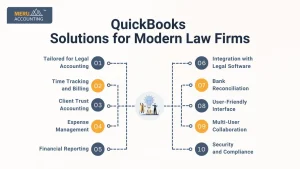
Financial Reporting
QuickBooks builds detailed reports with a few clicks. You can check income, spending, and case profits. These reports help you plan and grow your firm without missing key money data.
Integration with Legal Software
QuickBooks works well with many legal tools. You don’t need to enter the same data twice. This cuts down on errors and keeps your team working faster and with less effort.
Bank Reconciliation
QuickBooks matches your books with bank records. This saves time and finds errors fast. You can see where money went and fix gaps before they hurt your firm’s records or trust.
User-Friendly Interface
QuickBooks is renowned for its user-friendly interface, making it accessible for legal professionals with varying levels of accounting expertise. Intuitive navigation and a simple design contribute to a smoother user experience.
Multi-User Collaboration
Facilitating collaboration within the firm, QuickBooks allows multiple users to access the system simultaneously. This feature enhances teamwork and ensures that all stakeholders have real-time access to financial data.
Security and Compliance
QuickBooks prioritizes data security and compliance. With robust encryption measures and regular updates, the software helps law firms maintain the confidentiality of client information while meeting regulatory requirements.
Meru Accounting helps law firms like yours get full value from QuickBooks.We tailor QuickBooks for your firm’s needs. From trust accounts to legal billing, our team configures everything to match your workflow. Our team provides reports, reviews your books, and keeps everything tidy. Meru ensures your QuickBooks trust accounts follow all laws, with no errors or missing data.
FAQs
- Is QuickBooks good for small law firms?
Yes. QuickBooks fits small and solo law firms well. It tracks time, trust funds, and invoices. You don’t need extra tools or staff to manage your books. - Can I track trust accounts in QuickBooks?
Yes. You can set up trust accounts and track each client’s balance. This helps you follow legal rules and avoid mistakes. - Which QuickBooks version works best for law firms?
QuickBooks Online suits small and mid-sized firms. It’s simple and cloud-based. Bigger firms may choose QuickBooks Desktop for more detailed reports. - How does QuickBooks track billable hours?
You can log time for each client or task. Then link those hours to bills. This keeps billing fast, fair, and correct. - Can QuickBooks create reports by legal case?
Yes. QuickBooks lets you build reports by case or client. You can see time used, money earned, and case costs in a few steps. - Is QuickBooks safe for legal work?
Yes. QuickBooks uses strong safety tools. Your firm’s data stays private and protected in the cloud.