
What is Ecommerce sales tax and how is it calculated?
To run an online store well, you must know ecommerce sales tax. It is not just about sales or shipping. You must know when to charge tax and how much to collect. You also need to stay within the law. This guide will show the basics and key rules to help you avoid tax trouble. Ecommerce sales tax can change by state, city, or product type. Missing or wrong tax can lead to fines and audits. With the right plan, you can collect tax with ease, keep clear records, and grow your store with confidence.
What Is Ecommerce Sales Tax?
Ecommerce sales tax is a tax on goods and services sold online. It is a key part of managing tax for an ecommerce business. The seller collects this tax and sends it to the correct tax office. The tax rate depends on the seller’s location, the buyer’s location, and the type of product or service. Knowing about ecommerce sales tax is important for online businesses. It helps them follow the law and avoid fines. The tax ensures that sellers collect and report tax for ecommerce business sales correctly. Rules can differ from state to state or country to country. Sellers need to track their sales carefully in each region. Handling ecommerce sales tax properly saves money and keeps customers happy.
Why Ecommerce Businesses Must Care About Sales Tax
If you sell online, you must take ecommerce sales tax seriously. It may seem like a small issue, but the cost of ignoring it can be high. Let’s look at why it matters.
Legal Trouble and Fees
Not charging the correct tax for an ecommerce business can lead to fines or audits. States may ask for past dues and add interest or penalties. This can hurt your profit and cause stress.
Harm to Your Brand
Buyers trust stores that handle taxes well. If you make tax mistakes, it may cause delays or price issues. That can hurt trust, reduce repeat sales, and damage your brand.
Smarter Cost Planning
Knowing your tax duties helps you plan better. You can set prices that cover your tax costs and avoid last-minute surprises. It also keeps your books clean.
Easier Business Growth
With a good system in place, growth is simple. As your store reaches new states or even other countries, your tax setup helps you stay ready and avoid mistakes.
How Ecommerce Sales Tax Works Across Different States
Ecommerce sales tax varies greatly between U.S. states. Knowing where and how to apply it helps your store stay legal and avoids fines or customer disputes.
Origin vs. Destination-Based States
Some states follow origin-based rules, where the sales tax depends on your business location. Others use destination-based rules, where tax is based on where your customer lives. Knowing this helps you apply the right rates.
Local and State Tax
In many states, you must collect both state and local sales tax. This means you might have to add city or county tax rates to your base state rate, depending on the buyer’s location.
Online Marketplace Rules
If you sell through Amazon, Etsy, or eBay, they might collect and remit the tax on your behalf. But this doesn’t remove your need to report those sales and file returns properly.
What Triggers Tax Nexus in Ecommerce
Nexus can trigger tax for ecommerce business obligations in a state. You can create a nexus in many ways.
Physical Nexus
You create a physical nexus if your business has a store, office, warehouse, or inventory in a state. Even using third-party fulfillment centers can count toward physical nexus.
Economic Nexus
Economic nexus is triggered when your business reaches a sales or transaction limit in a state. Most states set this limit at $100,000 in sales or 200 transactions in a year.
Affiliate or Employee Nexus
Having a sales agent, employee, or affiliate located in a state can also create nexus. This means you must collect tax in states where your workers or partners operate.
How Ecommerce Sellers Can Register for Sales Tax
You must register before collecting ecommerce sales tax to stay compliant. This step is key to handling taxes for an ecommerce business legally and smartly.
Find Where You Have Nexus
Begin by naming the states where your business meets nexus rules. This tells you where you need to register and begin collecting tax from buyers.
Visit the State’s Tax Website
Most states offer online portals where you can apply for a sales tax permit. Registration is free in many states and only takes a short time to complete.
Keep Your Permit Safe
After registering, you’ll receive a sales tax ID number. This ID is needed when filing returns, collecting tax, and submitting payments to the tax office.
Renew When Needed
Some states require you to renew your permit each year or update business information. Set reminders to avoid lapses or expired permits.
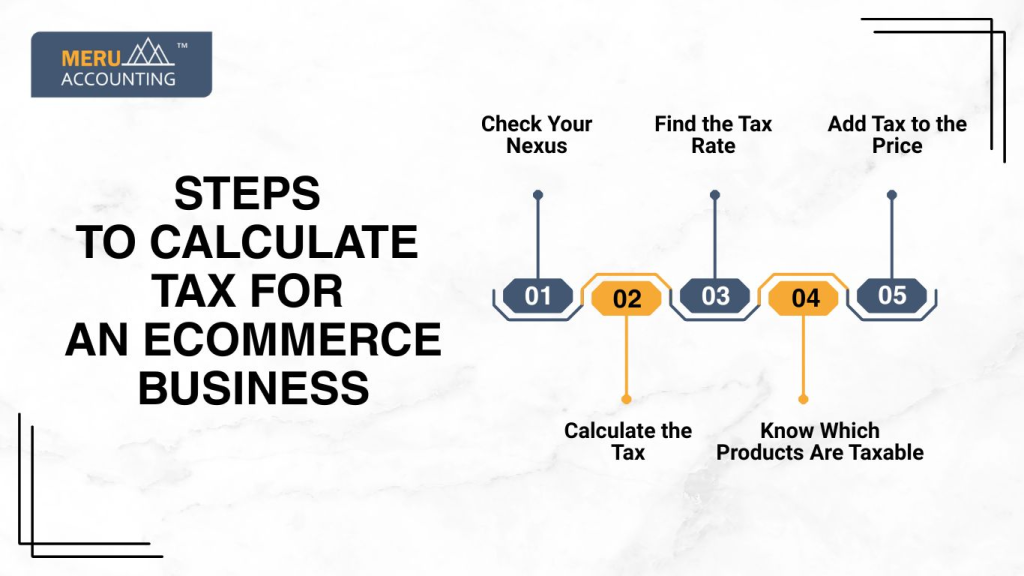
Steps to Calculate Tax for an Ecommerce Business
1. Check Your Nexus
Nexus is the link between your business and a state that asks you to collect tax. You may have nexus if you:
- Have a physical presence: office, warehouse, or staff in the state.
- Meet economic thresholds: sales in the state pass a set limit.
Knowing where you have nexus is the first step.
2. Know Which Products Are Taxable
Not every product is taxed. Check your items by:
- Type of product: food, clothes, or books may be exempt.
- State laws: rules differ from state to state.
3. Find the Tax Rate
Sales tax changes by location. To find it:
- Check state sites: official tax websites show rates.
- Use online tools: tax calculators give exact numbers.
4. Calculate the Tax
Use this formula:
Sales Tax = Sale Price × Tax Rate
Example: Item price ₹1,000, tax 10% → tax = ₹100.
5. Add Tax to the Price
Total cost = Sale Price + Sales Tax.
Example: ₹1,000 + ₹100 = ₹1,100 total.
Common Mistakes in Ecommerce Sales Tax Compliance
Small errors in ecommerce sales tax can lead to big costs.
Not Checking Nexus
Many sellers forget they may owe tax in states where they’ve reached nexus. Review your sales monthly to see where you meet tax thresholds and act quickly.
Using the Wrong Tax Rate
Charging the wrong rate can lead to losses or extra charges. You might have to give refunds or pay fines. Double-check rates to stay safe.
Missing Tax on Digital Sales
Many states charge tax on items like ebooks, apps, or videos. If you sell digital goods, check each state’s rules to avoid missing tax.
Not Knowing Marketplace Rules
Selling through sites like Amazon? Some platforms collect tax, but not all handle filings. You must still track and report your sales.
Late Tax Filing
Each state sets its due dates. If you file late, you may face fees or audits. Use tools and alerts to file on time, every time.
Best Tools to Automate Ecommerce Sales Tax Collection
Tools help manage taxes for an ecommerce business efficiently and reduce errors.
TaxJar
TaxJar connects with ecommerce platforms like Shopify, Amazon, and WooCommerce. It automatically calculates taxes, tracks nexus, and even helps with filing returns in various states.
Avalara
Avalara is a complete tax solution for growing businesses. It offers real-time rate updates, nexus alerts, and automated filings. It’s ideal for sellers with complex operations or high volume.
Shopify Tax Tools
Shopify’s built-in tax engine lets you set rules by region. It calculates tax on each order, keeps track of changes, and helps you manage reports directly from the dashboard.
WooCommerce Add-Ons
WooCommerce users can install plugins like TaxJar or Avalara for full tax support. These add-ons update rates, calculate tax at checkout, and simplify reporting and returns.
BigCommerce Features
BigCommerce offers robust tax settings out of the box. You can manage rates, monitor changes, and integrate with third-party tools for complete automation and peace of mind.
At Meru Accounting, our team helps you set up ecommerce sales tax correctly for your business. We set rates, check rules, and make sure you meet all compliance standards from day one. We file your tax returns on time, every time. Whether monthly or quarterly, we prepare your reports, handle errors, and submit returns without delays or extra charges. We reduce manual work, cut mistakes, and save you hours. You focus on sales while we handle compliance, tax collection, and state filings.
FAQs
- What is ecommerce sales tax?
Ecommerce sales tax is a charge added to online sales. It depends on where the buyer lives and your store’s link to that state. You must collect it when required.
- When does my ecommerce store need to collect tax?
If your business has a tax link (called a nexus) in a state, you must collect tax. Nexus can be based on sales, staff, warehouses, or partners in that state.
- Do sites like Amazon collect tax for sellers?
Yes, big sites like Amazon often collect tax for you. But you must still track sales and file tax reports to stay fully legal in every state.
- Are digital items taxed online?
Some states charge tax on digital goods like ebooks, software, or streaming. Others don’t. Always check state rules before selling digital items.
- What are the key tax rules for U.S. ecommerce stores?
The tax for ecommerce businesses in the U.S. changes by state. You must track where you sell, sign up with tax offices, collect the correct rate, and file returns on time.